Showing posts with label JavaScript Injection. Show all posts

Tuesday, March 19, 2019

JavaScript Injection Framework - Updates, Bugs and Fixes

The reason I am writing this blog post is to make readers aware of the latest version of the JavaScript Injection Framework and known bugs/fixes associated with the older versions.

If you read some of my previous posts on Branding and other UI enhancements, you may have come across several attempts made by me to find a means to globally (system wide) inject JavaScript/CSS. Unfortunately, there is no way to do this via delivered configuration/code so I ended up writing custom javascript code.

Over the years, I have made iterative improvements to this code and created a framework of sorts with a minimally invasive customization.

Early (Beta) version
https://pe0ples0ft.blogspot.com/2015/11/peopletools-854-branding-part-5b-fluid.html#FluJSInjectionBootstrap

Updated version (using RequireJS)
https://pe0ples0ft.blogspot.com/p/javascript-injection-framework.html

As I was making further changes, I moved this framework to GitHub in an effort to better manage the code/versioning.

GitHub Project
https://github.com/SasankVemana/PeopleTools-JavaScript-Injection-Framework

Recently, the following Doc ID was brought to my attention via a twitter post.

Oracle Support Document 2294106.1
E-PIA: Run to HTML,Excel and XML links in Query Manager and Query Viewer spinning for ever while running a report having prompt criteria

Twitter Thread
https://twitter.com/ArcherHuck/status/1085635936053051394
After reviewing Doc ID 2294106.1, I realized that this issue is most likely caused by a customer who implemented this JavaScript Injection Framework. The issue reported in the Doc ID, is very similar to an existing issue identified with an older version of the framework.

Reported Issue: https://pe0ples0ft.blogspot.com/p/javascript-injection-framework.html#c6317103235239955618

The solution provided by Oracle in the Doc ID is to completely remove the custom framework which is understandable since this is not Oracle code. But this issue can be overcome by using the latest version of the JavaScript Injection Framework. In the latest version of the bootstrap javascript as shown below, the regex pattern is updated to account for an extended list of PeopleSoft URL types.


Additionally, the latest version of the framework that is available on GitHub also addresses and fixes some race conditions (which I ran into under certain circumstances) associated with RequireJS and other custom scripts.

Here are some resources that are very useful to understand common timing issues related to javascript functions and callbacks.

https://blog.kevinchisholm.com/functions-javascript/javascript-callback-functions-the-absolute-basics/
https://www.sitepoint.com/understanding-requirejs-for-effective-javascript-module-loading/

Saturday, June 24, 2017

PeopleTools 8.55+ Branding: Using the Logo as a Hyperlink

It is a common practice in most social media and big brand websites to use the webpage logo as a hyperlink for navigation. This usually provides a mechanism for the users to 'return to home' in most cases. Here is a very interesting discussion on how this standard/convention originated:
https://ux.stackexchange.com/questions/81727/why-is-it-standard-for-a-website-logo-to-navigate-to-the-home-page

In the past, I have worked on requirements where we wanted the logo of a PeopleSoft application to hyperlink to the enterprise portal (which may or may not be PeopleSoft based). To generalize this requirement, let us assume that we want to hyperlink the PeopleSoft Logo to a configured URL (which could be any URL of our choice).

This post assumes that:
My environment details:
- CS 9.2 PUM Image 4
- PeopleTools 8.55.12

Adding a Hyperlink to the Logo on the Fluid Homepage:

The first step we need to do is to identify the HTML elements (divs, images, etc.) that are involved in generating the logo. It is very easy to identify this using the browser's developer tools (inspect element option).


As we can see, the logo image is added to the div (with the style class nuihdr_logo) as a pseudo-element using CSS. Here is a javascript object that selects this div (using the class selector) and adds a click event which redirects to a URL defined in a URL definition (CSK_LOGO_URL). This works well because the div element is completely enclosed within the image (psuedo-element) in terms of position on the webpage and as a result does not have any overflow issues. We will see how this can be an issue as we extent this functionality to the Classic Homepage (next section).

JavaScript Object: CSK_LOGO_URL_JS


I used the javascript injection framework to load this javascript object.


URL Definition Configuration:


Results:

Here is a demo of the Fluid Homepage Logo hyperlink.


Adding a Hyperlink to the Logo on the Classic Homepage:

In this section, we will extent the functionality discussed above to the logo on the Classic Homepage. Let us use the same approach and try to identify the HTML elements (divs, images, etc.) that are involved in generating the logo.


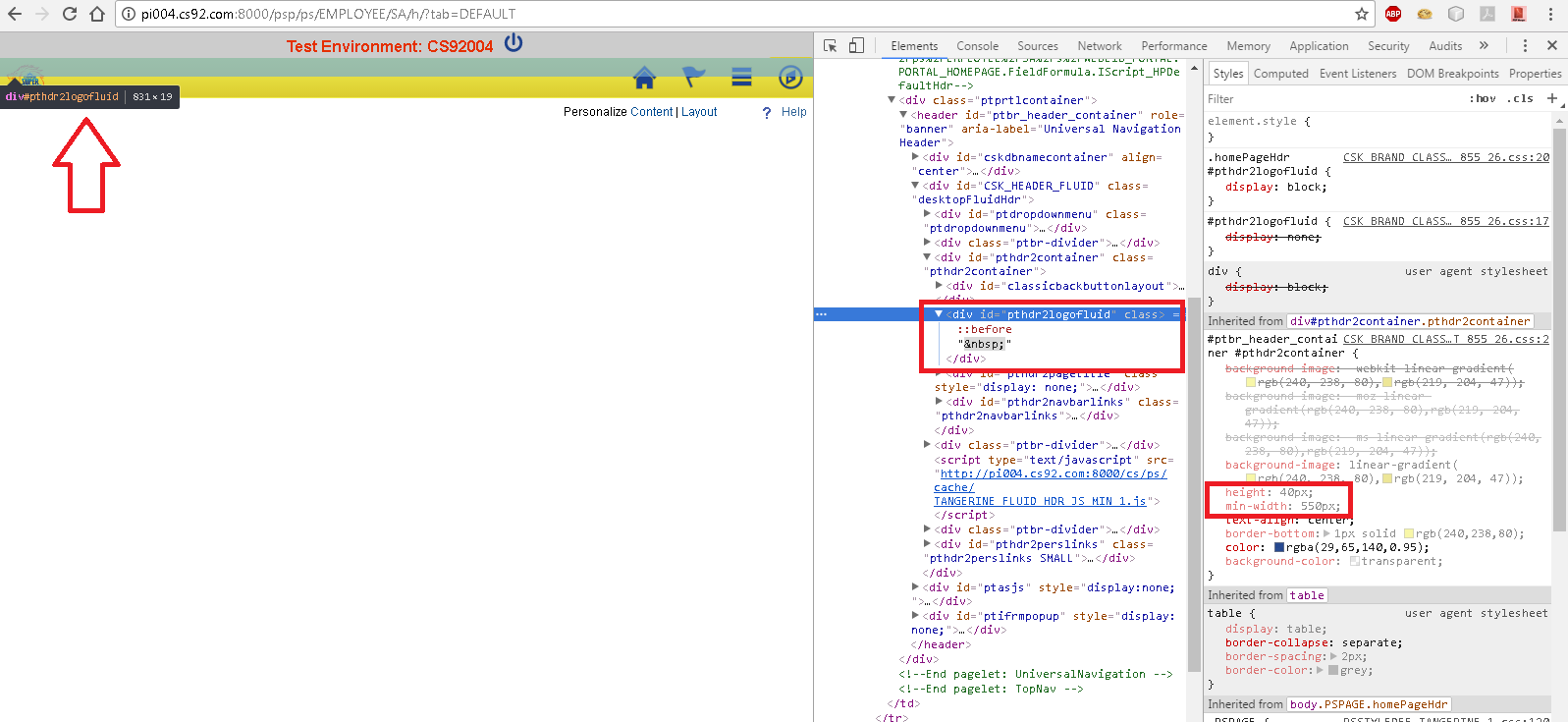
As we can see, the div element (with id pthdr2logofluid) spans the entire width of the page whereas the logo image which is added as a pseudo-element using css obviously does not. So, if we were to use the previous approach and add a click event function for this div (id pthdr2logofluid), then the entire div (which spans the width of the page) would become a hyperlink.

It is not very easy to selectively fire the click event function only on the pseudo element because pseudo elements are not part of the DOM and therefore cannot be manipulated using javascript. After a long search where I almost gave up, I found the following discussion where there was a solution for a similar requirement.

Refer: https://stackoverflow.com/questions/7478336/only-detect-click-event-on-pseudo-element
JSFiddle: http://jsfiddle.net/ZWw3Z/70/

We can take this idea and apply it to the Classic Homepage Logo by updating the javascript as follows:

Updated JavaScript Object: CSK_LOGO_URL_JS


The updated javascript code selects the div element (with id pthdr2logofluid) and sets all pointer-events to none using css. The javascript also has the click event function to redirect users to the URL configured in the URL definition (CSK_LOGO_URL).

Finally, the Classic stylesheet (CSK_BRAND_CLASSIC_TEMPLTE_FL) which is part of the Branding Theme in my environment which uses Theme Macro Set (click here for more details), was updated to set the cursor and pointer-events properties for the pseudo-element.


Results:

Here is a demo of the Classic Homepage Logo hyperlink.


Sunday, April 23, 2017

LinkedIn-style Smart Notifications in PeopleSoft: Integrating FavIcon and Page Title with Push Notifications

As part of the latest wave of changes that were done to the LinkedIn UI, I noticed that they also made a change to their FavIcon. The FavIcon alerts us if there is a new notification. Of course, the Page Title also shows us the number of new notifications similar to most modern websites (Twitter, Facebook, etc.). This is great feature especially when we are off "working" on other browser tabs to grab our attention.


Push Notification Framework has been part of PeopleSoft since PeopleTools 8.54 release. So, why not integrate the FavIcon and the Page Title with Push Notifications? This will help the users to return to their work if they receive a notification. Perhaps a UX/UI productivity feature?

Demo:

Here is a demo of how we can subscribe to the Push Notification events and dynamically update the FavIcon and the Page Title.


Environment Details:
- CS 9.2
- PUM Image 4
- PeopleTools 8.55.12

Step 1: Create a Custom FavIcon in Classic and Fluid

I wrote about this topic in the past (as part of my Branding articles). Currently, there is no delivered option to use a custom FavIcon in Classic and Fluid consistently.

Refer: Overriding FavIcon

Related Posts and Reference Documents:
PeopleTools 8.55+ - Using Oracle JET Series: Part 1, Part 2, Part 3 and Part 4
Global JavaScript Injection Framework
My Oracle Support > E-PIA: Does PeopleSoft Use Favicon ? (Doc ID 1226503.1)
My Oracle Support > E:FLUID- How To Access Favicon On Fluid Landing Pages? (Doc ID 2004996.1)

Step 2: Create a custom JavasScript to Subscribe to Push Notifications

JavaScript Object: CSK_SUB_PN_JS


Notes:

The script contains three main parts
- cskSmartFavIcon function takes care of replacing the custom FavIcon with an alternative custom alert FavIcon. It also takes care of pre-pending the Page Title with the notification counter in (n) format.
- The Push Notifications - Subscribe function is used to subscribe to the desired Push Notifications events.
- Finally, cskFavIconPNJS function (called from PTPN_NOTIFICATION_MSG_JS > DoNotify function) takes care of toggling the FavIcon and the Page Title when the user has clicked on the Notification Icon.

Step 3: Inject CSK_SUB_PN_JS globally across the application

As mentioned in reference documents in Step 1, I used my custom framework to inject CSK_SUB_PN_JS globally.


Step 4: Update delivered JS - PTPN_NOTIFICATION_MSG_JS

This will take care of toggling the FavIcon and resetting the Page Title when the user clicks on the Notification Icon.


Tuesday, November 22, 2016

Piwik: Open-Source Web Analytics Platform

While presenting at Oracle OpenWorld 2016, I demonstrated the integration of Google Analytics (GA) with PeopleSoft Applications for generating usage metrics. One of the big reasons that many find GA an attractive option aside from its superior features, is the fact that it is free. Of course, there are some limits to the term 'free'. After my presentation, I had an informative conversation with Greg Kelly from Oracle, who pointed out that just because a product is free, it does not necessarily mean it is the right solution for everyone. Greg also mentioned Piwik (hat tip), which is one of the most popular open-source web analytics platform and has an unique selling proposition of 100% data ownership.

In my personal opinion, Google Analytics is far more superior when it comes to functionality and features but I am aware that not everyone would be able to leverage Google Analytics due to various reasons (primarily data ownership). That said, Piwik is a great alternative for such customers to create a locally or cloud hosted web analytics platform which provides full control of their data. I am stating the obvious but Piwik does come with the cost of setting up and maintaining the infrastructure to host it somewhere.

Here are some resources that I found interesting and relevant to this topic (there may be many more out there):
https://zenincognito.com/piwik-vs-google-analytics-a-detailed-review/
https://piwik.pro/2016/05/infographic-piwik-vs-google-analytics/
http://www.kaushik.net/avinash/how-to-choose-a-web-analytics-tool-a-radical-alternative/

Here is my recent blog on how to integrate Google Analytics with PeopleSoft Applications:
https://pe0ples0ft.blogspot.com/2016/09/peopletools-using-ga-analytics-js.html

Here are the steps that I followed to setup and integrate Piwik with a PeopleSoft instance (HCM 9.2 PUM 17 - PeopleTools 8.55.06).

Step 1: Download and install Piwik

Resource: http://piwik.org/docs/installation/

In my cases, I downloaded Piwik from the Microsoft Windows Web App Gallery.
http://piwik.org/blog/2013/02/piwik-microsoft-windows-web-app-gallery/

Then, I followed the installation wizard to install Piwik on my Windows 7 desktop computer where my PUM image is also running.

Some gotchas for Windows installation based on my experience.

Windows Firewall Inbound Rules:

I had to punch a hole in the Windows Firewall and set up an inbound rule to allow requests on a port of choice.

Windows Firewall > Advanced Settings > Inbound Rules


IISExpress - Site Binding Configuration (applicationhost.cfg):

I also had to add site bindings to the IISExpress applicationhost.cfg to handle URL binding failures.
https://www.iis.net/learn/extensions/using-iis-express/handling-url-binding-failures-in-iis-express


Add trusted hosts to Piwik config.ini.php:

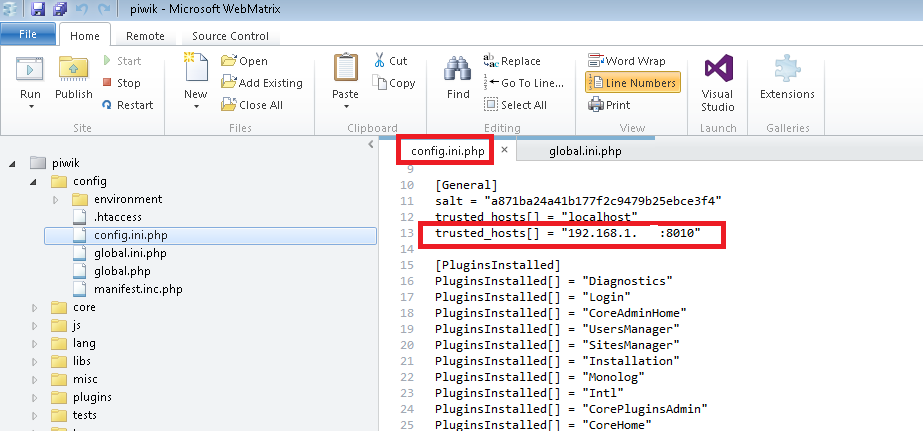
Finally, I had to add my localhost ip+port combination to the config.ini.php file as a trusted host.

WebMatrix > Piwik > config > environment > config.ini.php > trusted_hosts


Step 2: Login to the Piwik Admin Console and add a new site

Reference: http://piwik.org/docs/manage-websites/

Step 3: Obtain Piwik Tracking Code JavaScript snippet

Piwik > Administration > Websites > Manage Websites > View Tracking Code

You will find code similar to the following screenshot:


Next, I created a Branding Object in PeopleTools with the preceding javascript:

Navigation: PeopleTools > Portal > Branding > Branding Objects


Note: I only used the code snippet inside the script tag and also commented out the noscript portion for this proof of concept.

Step 4: Inject custom javascript in PeopleSoft

This part is similar to the Google Analytics javascript injection. To inject this custom javascript object across the PeopleSoft application, I used a custom framework for Global JS Injection. Details are in the following link:
Global JavasScript Injection Framework


Note: You don't have to use the same Global JS Injection Framework. You could use any other technique that might work best for your environment. The idea is to make sure the javascript is executed on every single page across the PeopleSoft application to send the usage metrics to the Piwik server.

Results:

Here is a screenshot of the Piwik Dashboard.


Monday, June 13, 2016

PeopleTools 8.55 - Oracle JET - Using ACE Editor for Online Branding Objects (HTML, JavaScript, Style Sheets)

Have you ever wondered if there is a better way to edit the "Branding Objects" that are available online (PeopleTools > Portal > Branding > Branding Objects)?

If you have managed Branding Objects (JavaScript, HTML and CSS) online, you would have noticed that the editor is a simple 'textarea'. It is not a great UI and it makes it really difficult to manage/write anything more than a few lines.

E.g.:


Although it is great that, starting with PeopleTools 8.53, we now have the ability to manipulate javascript, html and css objects online (instead of using App Designer), the major part of reading/understanding/writing the code probably needs to be done outside on a text editor which has better support for the markup/syntax.

Why not a code editor for the web?

If you attended Jim Marion's popular session 'PeopleTools Tips and Techniques' either at Oracle OpenWorld 2015 conference or HEUG - Alliance 2016 conference, you might have seen him show us how he created a custom page to manage javascript content using ACE Editor. When I asked him how he built something like that, he mentioned that he used AJAX to marshal the content and the page itself is fronted by a component for searching, but is really an iScript for display and an iScript for saving. It was a brilliant idea to use a high performance code editor to manage such objects (some features/benefits include auto complete, syntax highlighter for over 100 languages, better maintenance/display of indending/outdending, folding function/code modules and overall better readability).

Jim's approach involved storing the javascript contents in a custom table and then referencing them as needed. I wanted to take the same idea and create a mechanism to integrate ACE Editor with any page field (textarea). At the same time, I did not want to customize anything. So, I want my approach to be very similar to creating/enabling Rich Text page fields but instead of using App Designer, I want to simply inject a custom javascript to the page and enable the ACE Editor. Another difference with my approach is that I want to use JavaScript and the component processor to take care of marshaling and saving the data instead of using the AJAX/IScripts option.

Do any challenges come to mind?

- How do we replace the existing 'textarea' on the page with the ACE Editor?
- Next, how do we transfer the contents of the ACE Editor to the page field 'textarea'?
- Next, how do we make the component processor accept and honor this change made to the buffer via JavaScript (especially because we are not customizing the page and the page field may not have the 'Modifiable by JavaScript' setting enabled)?

Here are steps I went through to integrate ACE Editor with the PeopleTools - Branding Objects Page. If you like this idea and implementation, then please click here to vote for it on My Oracle Support Community.

Note:
  1. A similar approach could be used to extend the ACE Editor functionality to any other page field - textarea.
  2. I used the latest version of my 'Global JavaScript/Style Sheet Injection Bootstrap' (using Oracle JET and more importantly requireJS) to inject a custom javascript into the 'Branding Objects' page. If you choose not to use this approach, then you will need to find an alternative way to inject the custom javascript but the core functionality of the js code should work as described. (Refer: 'Using Oracle JET' series - Part 1, Part 2, Part 3 and Part 4).
Step 1: Download the ACE Editor library and store it locally on the web server

I downloaded the ACE Editor library from the following github URL and placed it on my web server:
https://github.com/ajaxorg/ace-builds/archive/master.zip

Web Server:


Just to show the library folder structure, here is a screenshot highlighting the path to the ace.js file.


Step 2: Add new function cskGetFormName() to our JS Bootstrap (CSK_FL_BOOTSTRAP_JS)

Function Name: cskGetFormName


This function helps us resolve the %FormName meta-html which is not available currently for client side javascript. So, we cannot use it, for example, as submitAction_%FormName in a client side javascript. The expectation is that it would resolve itself to submitAction_win0, submitAction_win1 or submitAction_winN depending on the current window. So, I wrote this function to determine the %FormName portion as a string, which I will be using in the next step as part of FSU_ACE_CFG_JS javascript code.

Step 3: Create Custom JavaScript Object (CSK_ACE_CFG_JS) to configure the ACE Editor on the desired page

JavaScript Object: CSK_ACE_CFG_JS


Explaining the Script:
  • First, you will notice that I am adding the ACE Editor library path to the requireJS configuration locally instead of using the requireJS configuration script object (CSK_REQUIIRE_CFG_JS). The reason I am appending to the requireJS paths locally is because, we don't want this library to get loaded for the entire application, rather just conditionally to a specific page. In step 4, I will detail how to achieve that using the Global Injection Bootstrap (CSK_FL_BOOTSTRAP_JS).
  • Next, I am defining jquery, ace.js and jqueryui as dependencies for the function execution using requireJS.
  • Inside the function execution, I included BOOTSTRAP 3.0.0 (which was downloaded from this link and stored in a custom object) and JQUERY 1.8.17 (delivered object) CSS. I am using the custom function cskLoadCSS to take care of the CSS loading.
  • Next, I search for the textarea (id="PTBR_MGOBJ_WRK_PTBR_HTMLAREA1"), hide it and replace it with the ACE Editor div.
  • Now the delivered textarea is hidden and our custom ACE Editor is in the DOM. Further, I used a basic set of configuration options for the Editor which we can certainly expand depending on our use case (ACE Editor is highly configurable). Also, I am dynamically setting the mode of the Editor to either html, javascript or css depending on the object type that we are updating. As part of the Editor configuration, I also initialized the contents of the ACE Editor with the contents of textarea.
  • Lastly and most importantly, we update the textarea (now hidden) with the latest contents of the ACE Editor any time there is a change in the editor contents. 
  • addchg_%FormName Function: The trick to make the component buffer accept and honor the changes made to the textarea (PTBR_MGOBJ_WRK_PTBR_HTMLAREA1) - via client side javascript - is to use the addchg_%FormName function. I had no idea about the existence of such a function and its significance. I learned about this gem from Chris Malek while discussing and troubleshooting an unrelated issue with Fluid!

Step 4: Conditionally Load ACE Editor Config JavaScript (CSK_ACE_CFG_JS) using the Global JavaScript Injection Bootstrap

The conditional logic to only load CSK_ACE_CFG_JS on the Secondary Page PTBR_ADDHTML_SEC, can be found in the cskInjectJS function which is part of CSK_FL_BOOTSTRAP_JS object. An updated version of CSK_FL_BOOTSTRAP_JS source code can be found here.


Results:

HTML:


JavaScript:


CSS:


Now we are ready to enjoy the ACE Editor for writing code! Once again, if you like this idea and implementation, then please click here to vote for it on My Oracle Support Community.

Sunday, June 12, 2016

PeopleTools 8.55+ - Using Oracle JET (JQuery, JQueryUI, requireJS and more) - Part 4

This post is a continuation of my 'PeopleTools 8.55+ - Using Oracle JET' series (refer: Part 1, Part 2 and Part 3).

In Part 1 (refer: Global JavaScript Injection Bootstrap for Fluid UI - Step 3), I pointed out that using 'Branding System Options' for injecting javascript in Classic pages would result in them getting invoked more than once (per header, pagelet, target frame, etc.). For most Branding Tasks, this might not be necessary since we are only dealing with the header portion of the HTML and other general styling.

All the topics described so far in this series worked fine with the 'Global JavaScript Injection Bootstrap' getting invoked just once as detailed in Step 2 and Step 3. But there may be some advanced requirements possibly outside the scope of Branding where we may intend to inject the Global JavaScript once per header, pagelet, target frame, etc. in order to manipulate the target content area, form data/component buffer and so on. For such cases (to be detailed in a subsequent post), we could use the following alternative step to include our 'Global JavaScript Injection' Bootstrap JS.

Note: The following step would replace Step 2 and Step 3 (which means we need to revert both those changes).

Add CSK_FL_BOOTSTRAP_JS to Classic and Fluid using PT_UTIL JS object:

PT_UTIL is a delivered javascript object that is included in Fluid (via PT_COMMON_FMODE) and Classic (via PT_COMMON). My thought was to simply include our custom bootstrap javascript object in PT_UTIL (using the %include meta-html).


Additionally, I updated the javascript CSK_FL_DBNAME_JS as follows:

Object Name: CSK_FL_DBNAME_JS


The only change was the window.self == window.top condition to avoid the following 'custom header repetition' problem.


The rest of the javascript objects detailed so far in this series should work as-is without any issues.

Saturday, June 4, 2016

PeopleTools 8.55: What is %include Meta-HTML function?

I found this gem of a Meta-HTML function that has been hiding deep in the bowels of PeopleTools javascript.

I was digging into some of the delivered javascript functions in a HCM 9.2 PUM Image 17 which is on PeopleTools 8.55.03. When I looked in the PT_COMMON HTML object, I almost jumped out of my couch. :)


Just to be sure, I checked if this function exists in 8.54 or prior tools releases. Correction: I found one occurrence in 8.54 (PT_PAGESCRIPT_FMODE) which leads me to believe that this function was probably introduced in PeopleTools 8.54 (so it is not new to 8.55 as I previously thought).

It appears that this undocumented (since it is not referenced anywhere in PeopleBooks) Meta-HTML function can be used to include other javascripts objects inline. This can be very handy!

Let us see how this works.

I created a custom JavaScript object (CSK_TEST) using Branding Objects.


Next, I added this to my Bootstrap JavaScript (CSK_FL_BOOTSTRAP_JS) as follows (Refer: PeopleTools 8.55+ - Using Oracle JET (JQuery, JQueryUI, requireJS and more) - Part 1).


Let us see this in action.


Here is how the %include function gets resolved at runtime:


I can see many great uses for this Meta-HTML function! :)

Monday, May 30, 2016

PeopleTools 8.55+ - Using Oracle JET (JQuery, JQueryUI, requireJS and more) - Part 3

This post is a continuation of PeopleTools 8.55+ - Using Oracle JET to leverage open-source libraries such as JQuery, JQueryUI, requireJS, etc. - Part 1 and Part 2.

In Part 1, I described how to create a JavaScript Injection Bootstrap framework particularly useful for Fluid UI since the Branding System Options only work for Classic. Similarly, let us assume we want to add custom styles to Fluid UI. How do we achieve something like that? We could use the 'Global Override Style Sheet' (CSK_BRAND_FLUID_TEMPLATE) which is part of our custom theme (CSK_THEME_FLUID). This would work just fine if we are either overriding a existing delivered Fluid style class or if we are adding some additional custom styles to the 'Global Override Style Sheet'. But what if we want to load entire style sheets from open source libraries such as JQueryUI? What if we want a configuration that allows us to inject style sheets globally as and when new requirements come up? Wouldn't it be great to have a global style sheet injection framework similar to the 'JavaScript Injection Bootstrap' from Part 1?

Global Style Sheet Injection:

I added a couple of javascript functions to my existing bootstrap javascript object (CSK_FL_BOOTSTRAP_JS).

JavaScript Functions: getCSSUrl(cssId) and cskLoadCSS(path)


As the names suggest, getCSSUrl uses the delivered IScript_GET_CSS to return the URL of a CSS object on the web server cache directory and cskLoadCSS would inject the CSS with a specified source path to the DOM.

CSK_FL_BOOTSTRAP_JS:


Now, we should be able to use the function cskLoadCSS and getCSSURL, (e.g.: cskLoadCSS(getCSSUrl('PSJQUERY_BASE_1_8_17'));...) from any javascript (e.g.: CSK_FL_BOOTSTRAP_JS), to inject style sheets globally across the application. I will demonstrate this in a use case as part of the next section.

Fluid UI - Control + J Alternative using JQuery, JQueryUI and requireJS:

In Part 1 and 2, although we used requireJS as part of Oracle JET, we only employed it for a simple use case of loading the JQuery library. In this section, I will demonstrate how we can use requireJS for a more complex requirement where we will need to load more than one version of the JQuery library along with JQueryUI. This use case is to create an alternative and a device agnostic approach for surfacing the Control + J information to the end users in Fluid UI (click here for more details).

As I mentioned previously, my requireJS configuration was very basic and derived from a delivered example for the purposes of Part I and Part 2. In this section, I will update my requireJS configuration (CSK_REQUIRE_CFG_JS) based on requireJS documentation.

Update JavaScript Object: CSK_REQUIRE_CFG_JS


You can see that I have added the two versions of JQuery to the path mapping as jquery for version 2.1.3 (part of Oracle JET) and jquery_1_7_2 for version 1.7.2 (stored as a custom javascript object CSK_JQUERY_1_7_2_JS and added via Branding Objects). I also added jqueryUI version 1.11.4 which is available as a delivered object - PT_JQUERY_1_X_JS. Lastly, jquery-private takes care of mapping modules to use NoConflict (click here for more details).

Note: The javascripts CSK_FL_DBNAME_JS and CSK_OVERRIDE_IMAGE_JS created in Part 1 and 2 will continue to work with the update version of CSK_REQUIRE_CFG_JS.

Next, I created an updated version of my CSK_FL_CTRL_J_JS javascript object.

JavaScript Object: CSK_FL_CTRL_J_JS


The main difference is that I am using requireJS to load jquery_1_7_2 and jqueryui as dependencies for this javascript. Also, notice that I am using cskLoadCSS function to inject the style sheet PSJQUERY_BASE_1_8_17 (delivered object that contains jQuery UI CSS Framework 1.8.17) and CSK_CONTROL_J_CSS (custom style sheet to manage some quirks with Control + J - JQueryUI Dialog styling).

Style Sheet Object: CSK_CONTROL_J_CSS


Why do we need CSK_CONTROL_J_CSS?

To handle quirks with JQueryUI styling due to using different versions of JQueryUI and JQueryUI CSS.

Quirk 1:


Quirk 2:


Load Fluid Control + J JavaScript (CSK_FL_CTRL_J_JS) using the Fluid JavaScript Injection Bootstrap:

Simply add CSK_FL_CTRL_JS to the cskInjectJS function in CSK_FL_BOOTSTRAP_JS object.


Results:

To invoke the "Troubleshooting Information" dialog, all we have to do is to press the mouse (PC/Mac) or touch the screen (mobile devices) - anywhere on the webpage - continuously for 5 seconds!


Sunday, May 29, 2016

PeopleTools 8.55+ - Using Oracle JET (JQuery, JQueryUI, requireJS and more) - Part 2

In my recent post (click here), I detailed how we could use Oracle JET to safely and efficiently take advantage of some the common open source libraries such as JQuery, JQueryUI, requireJS, etc. I also created a cleaner version of my JavaScript Injection Bootstrap and used it to inject a custom javascript (which uses JQuery) to add an environment specific header for both Fluid and Classic in PeopleTools 8.55.

In this post, I want to continue with that process and re-write the configurable image replacement technique that I described for PeopleTools 8.54 (click here for more details).

IScript for Image Object Source URL Resolution:
 
Reference to the previous version of the IScript: Click here.

Since using meta-HTML such as %Image and %JavaScript does not work in JavaScript objects, I created my own version of  an IScript which returns the URL referencing an image object on the web server (loaded on the cache directory).

WEBLIB_FL_CSK.ISCRIPT1.FieldFormula - IScript_CSK_GET_IMG


PeopleCode for reference:

Function IScript_CSK_GET_IMG
  
   Local string &img = %Request.GetParameter("img");
  
   &url = %Response.GetImageURL(@("Image." | &img));
   %Response.RedirectURL(&url);
 
End-Function;


Create a custom javascript function and add it to the JavaScript Injection Bootstrap (CSK_FL_BOOTSTRAP_JS):

This function would help us to mask some of the details to access the preceding IScript to get the Image URL (similar to the getScriptURL function which I borrowed from Jim Marion's blog).

Function Name: getImageURL


Let us add this function to the JavaScript Injection Bootstrap:


Configurable JavaScript for Image Replacement (CSK_OVERRIDE_IMAGE_JS):

Object Name: CSK_OVERRIDE_IMAGE_JS


This javascript object CSK_OVERRIDE_IMAGE_JS is a re-write of my previous version which was called CSK_FL_IR_JS. You will notice that I am using requireJS to load the JQuery library that I need for this function execution. I am also using the getImageUrl function which I previously detailed to get the URL of the custom images. These URLs will be used to override the corresponding delivered counterparts. Right now, I have two examples for image replacement: 1) Replace the delivered Favorite Icon with a custom image (CSK_LOGO_FAVICON) and replace the delivered 'Processing' icon for Fluid with a custom image (CSK_PROCESSING_FMODE).

LOGO_FAVICON (delivered):


CSK_LOGO_FAVICON (custom):


PT_PROCESSING_FMODE (delivered):


CSK_PROCESSING_FMODE (custom):


Similarly, we can configure additional image replacements by simply appending code to the CSK_OVERRIDE_IMAGE_JS javascript object.

Load Image Replacement JavaScript using the Fluid JavaScript Injection Bootstrap:

Simply add CSK_OVERRIDE_IMAGE_JS to the cskInjectJS function in CSK_FL_BOOTSTRAP_JS object.


Results: