This post is a continuation of PeopleTools 8.55+ - Using Oracle JET to leverage open-source libraries such as JQuery, JQueryUI, requireJS, etc. - Part 1 and Part 2.
In Part 1, I described how to create a JavaScript Injection Bootstrap framework particularly useful for Fluid UI since the Branding System Options only work for Classic. Similarly, let us assume we want to add custom styles to Fluid UI. How do we achieve something like that? We could use the 'Global Override Style Sheet' (CSK_BRAND_FLUID_TEMPLATE) which is part of our custom theme (CSK_THEME_FLUID). This would work just fine if we are either overriding a existing delivered Fluid style class or if we are adding some additional custom styles to the 'Global Override Style Sheet'. But what if we want to load entire style sheets from open source libraries such as JQueryUI? What if we want a configuration that allows us to inject style sheets globally as and when new requirements come up? Wouldn't it be great to have a global style sheet injection framework similar to the 'JavaScript Injection Bootstrap' from Part 1?
Global Style Sheet Injection:
I added a couple of javascript functions to my existing bootstrap javascript object (CSK_FL_BOOTSTRAP_JS).
JavaScript Functions: getCSSUrl(cssId) and cskLoadCSS(path)
As the names suggest, getCSSUrl uses the delivered IScript_GET_CSS to return the URL of a CSS object on the web server cache directory and cskLoadCSS would inject the CSS with a specified source path to the DOM.
CSK_FL_BOOTSTRAP_JS:

Now, we should be able to use the function cskLoadCSS and getCSSURL, (e.g.: cskLoadCSS(getCSSUrl('PSJQUERY_BASE_1_8_17'));...) from any javascript (e.g.: CSK_FL_BOOTSTRAP_JS), to inject style sheets globally across the application. I will demonstrate this in a use case as part of the next section.
Fluid UI - Control + J Alternative using JQuery, JQueryUI and requireJS:
In Part 1 and 2, although we used requireJS as part of Oracle JET, we only employed it for a simple use case of loading the JQuery library. In this section, I will demonstrate how we can use requireJS for a more complex requirement where we will need to load more than one version of the JQuery library along with JQueryUI. This use case is to create an alternative and a device agnostic approach for surfacing the Control + J information to the end users in Fluid UI (click here for more details).
As I mentioned previously, my requireJS configuration was very basic and derived from a delivered example for the purposes of Part I and Part 2. In this section, I will update my requireJS configuration (CSK_REQUIRE_CFG_JS) based on requireJS documentation.
Update JavaScript Object: CSK_REQUIRE_CFG_JS
You can see that I have added the two versions of JQuery to the path mapping as jquery for version 2.1.3 (part of Oracle JET) and jquery_1_7_2 for version 1.7.2 (stored as a custom javascript object CSK_JQUERY_1_7_2_JS and added via Branding Objects). I also added jqueryUI version 1.11.4 which is available as a delivered object - PT_JQUERY_1_X_JS. Lastly, jquery-private takes care of mapping modules to use NoConflict (click here for more details).
Note: The javascripts CSK_FL_DBNAME_JS and CSK_OVERRIDE_IMAGE_JS created in Part 1 and 2 will continue to work with the update version of CSK_REQUIRE_CFG_JS.
Next, I created an updated version of my CSK_FL_CTRL_J_JS javascript object.
JavaScript Object: CSK_FL_CTRL_J_JS
The main difference is that I am using requireJS to load jquery_1_7_2 and jqueryui as dependencies for this javascript. Also, notice that I am using cskLoadCSS function to inject the style sheet PSJQUERY_BASE_1_8_17 (delivered object that contains jQuery UI CSS Framework 1.8.17) and CSK_CONTROL_J_CSS (custom style sheet to manage some quirks with Control + J - JQueryUI Dialog styling).
Style Sheet Object: CSK_CONTROL_J_CSS
Why do we need CSK_CONTROL_J_CSS?
To handle quirks with JQueryUI styling due to using different versions of JQueryUI and JQueryUI CSS.
Quirk 1:

Quirk 2:

Load Fluid Control + J JavaScript (CSK_FL_CTRL_J_JS) using the Fluid JavaScript Injection Bootstrap:
Simply add CSK_FL_CTRL_JS to the cskInjectJS function in CSK_FL_BOOTSTRAP_JS object.

Results:
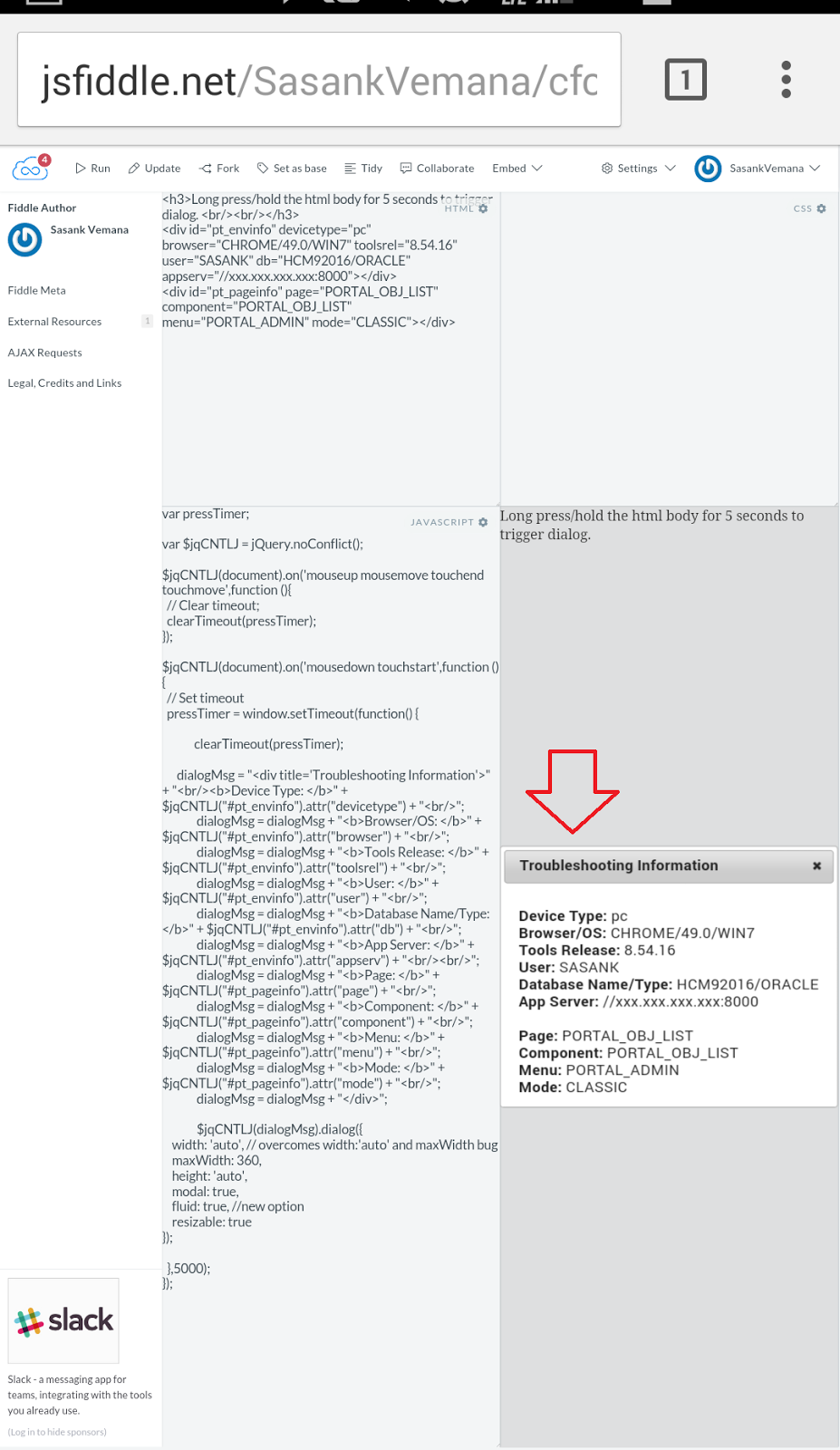
To invoke the "Troubleshooting Information" dialog, all we have to do is to press the mouse (PC/Mac) or touch the screen (mobile devices) - anywhere on the webpage - continuously for 5 seconds!


In Part 1, I described how to create a JavaScript Injection Bootstrap framework particularly useful for Fluid UI since the Branding System Options only work for Classic. Similarly, let us assume we want to add custom styles to Fluid UI. How do we achieve something like that? We could use the 'Global Override Style Sheet' (CSK_BRAND_FLUID_TEMPLATE) which is part of our custom theme (CSK_THEME_FLUID). This would work just fine if we are either overriding a existing delivered Fluid style class or if we are adding some additional custom styles to the 'Global Override Style Sheet'. But what if we want to load entire style sheets from open source libraries such as JQueryUI? What if we want a configuration that allows us to inject style sheets globally as and when new requirements come up? Wouldn't it be great to have a global style sheet injection framework similar to the 'JavaScript Injection Bootstrap' from Part 1?
Global Style Sheet Injection:
I added a couple of javascript functions to my existing bootstrap javascript object (CSK_FL_BOOTSTRAP_JS).
JavaScript Functions: getCSSUrl(cssId) and cskLoadCSS(path)
As the names suggest, getCSSUrl uses the delivered IScript_GET_CSS to return the URL of a CSS object on the web server cache directory and cskLoadCSS would inject the CSS with a specified source path to the DOM.
CSK_FL_BOOTSTRAP_JS:

Now, we should be able to use the function cskLoadCSS and getCSSURL, (e.g.: cskLoadCSS(getCSSUrl('PSJQUERY_BASE_1_8_17'));...) from any javascript (e.g.: CSK_FL_BOOTSTRAP_JS), to inject style sheets globally across the application. I will demonstrate this in a use case as part of the next section.
Fluid UI - Control + J Alternative using JQuery, JQueryUI and requireJS:
In Part 1 and 2, although we used requireJS as part of Oracle JET, we only employed it for a simple use case of loading the JQuery library. In this section, I will demonstrate how we can use requireJS for a more complex requirement where we will need to load more than one version of the JQuery library along with JQueryUI. This use case is to create an alternative and a device agnostic approach for surfacing the Control + J information to the end users in Fluid UI (click here for more details).
As I mentioned previously, my requireJS configuration was very basic and derived from a delivered example for the purposes of Part I and Part 2. In this section, I will update my requireJS configuration (CSK_REQUIRE_CFG_JS) based on requireJS documentation.
Update JavaScript Object: CSK_REQUIRE_CFG_JS
You can see that I have added the two versions of JQuery to the path mapping as jquery for version 2.1.3 (part of Oracle JET) and jquery_1_7_2 for version 1.7.2 (stored as a custom javascript object CSK_JQUERY_1_7_2_JS and added via Branding Objects). I also added jqueryUI version 1.11.4 which is available as a delivered object - PT_JQUERY_1_X_JS. Lastly, jquery-private takes care of mapping modules to use NoConflict (click here for more details).
Note: The javascripts CSK_FL_DBNAME_JS and CSK_OVERRIDE_IMAGE_JS created in Part 1 and 2 will continue to work with the update version of CSK_REQUIRE_CFG_JS.
Next, I created an updated version of my CSK_FL_CTRL_J_JS javascript object.
JavaScript Object: CSK_FL_CTRL_J_JS
The main difference is that I am using requireJS to load jquery_1_7_2 and jqueryui as dependencies for this javascript. Also, notice that I am using cskLoadCSS function to inject the style sheet PSJQUERY_BASE_1_8_17 (delivered object that contains jQuery UI CSS Framework 1.8.17) and CSK_CONTROL_J_CSS (custom style sheet to manage some quirks with Control + J - JQueryUI Dialog styling).
Style Sheet Object: CSK_CONTROL_J_CSS
Why do we need CSK_CONTROL_J_CSS?
To handle quirks with JQueryUI styling due to using different versions of JQueryUI and JQueryUI CSS.
Quirk 1:

Quirk 2:

Load Fluid Control + J JavaScript (CSK_FL_CTRL_J_JS) using the Fluid JavaScript Injection Bootstrap:
Simply add CSK_FL_CTRL_JS to the cskInjectJS function in CSK_FL_BOOTSTRAP_JS object.

Results:
To invoke the "Troubleshooting Information" dialog, all we have to do is to press the mouse (PC/Mac) or touch the screen (mobile devices) - anywhere on the webpage - continuously for 5 seconds!