The following question was posted on one of my blog posts:
https://pe0ples0ft.blogspot.com/2018/09/decoupling-add-to-functionality.html#c9053788640685351670
Question: Is there any way to add my favorite queries into the MyFav in fluid via code dynamically?
To provide some context, the delivered 'My Favorite Queries' feature within the 'Query Manager' page allows users to favorite/bookmark frequently used queries. We can see a demo of this feature in the video below.
Add To 'My Favorite Queries'

The requirement here is to dynamically display the user queries from 'My Favorite Queries' as links/shortcuts in the NavBar - 'Favorites' tile content.
I am sure there are many ways we can achieve this programmatically. As a proof of concept, I used Event Mapping Framework to execute additional custom logic on
Why

In the custom Event Mapping App Class - which is configured to execute as as post process to the
Demo of solution

Implementation Details
Download App Designer Project from GitHub: https://github.com/SasankVemana/MyFavQueriesAsNavBarFavorites
Notes:
The following Event Mapping App Package/Class contains the custom logic to display 'My Favorite Queries' in the NavBar - 'Favorites' tile content.

SV_EVENT_MAPPING_PKG.NUI.AddMyFavQueries.OnExecute
This app class is mapped to the
SV_EVENT_MAPPING_PKG.Utils.PSQueryAsFavorites.OnExecute
This app class is used by the Event Mapping app class (refer line 19 and 20) to append the 'My Favorite Queries' to the NavBar - Favorites Content Collection. This app class is cloned from the delivered
Dummy Content Reference
The following content reference (

This CREF is referenced in

Helper Function -
This function is called by the custom event mapping app class (line 22) to append a Collection to NavBar Content Area. The logic in this function is cloned/borrowed from the delivered

Related Content Service Definition

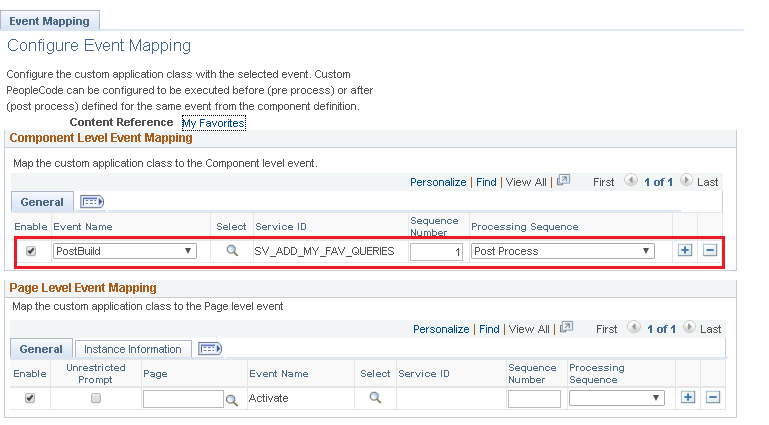
Event Mapping Configuration


https://pe0ples0ft.blogspot.com/2018/09/decoupling-add-to-functionality.html#c9053788640685351670
Question: Is there any way to add my favorite queries into the MyFav in fluid via code dynamically?
To provide some context, the delivered 'My Favorite Queries' feature within the 'Query Manager' page allows users to favorite/bookmark frequently used queries. We can see a demo of this feature in the video below.
Add To 'My Favorite Queries'

The requirement here is to dynamically display the user queries from 'My Favorite Queries' as links/shortcuts in the NavBar - 'Favorites' tile content.
I am sure there are many ways we can achieve this programmatically. As a proof of concept, I used Event Mapping Framework to execute additional custom logic on
PTNUI_MYFAV_COMP component PostBuild event. This approach will be customization free!Why
PTNUI_MYFAV_COMP component? Because it is the PeopleTools delivered component used to render the NavBar - 'Favorites' tile content. We can see the content reference PTNUI_NB_FAV that is associated with the PTNUI_MYFAV_COMP component in the screenshot below.
In the custom Event Mapping App Class - which is configured to execute as as post process to the
PTNUI_MYFAV_COMP component PostBuild event, I simply appended the current user's 'Favorite Queries' to the NavBar - 'Favorites' Content Collection. We can see a demonstration of 'My Favorite Queries' displayed in the NavBar - 'Favorites' below.Demo of solution

Implementation Details
Download App Designer Project from GitHub: https://github.com/SasankVemana/MyFavQueriesAsNavBarFavorites
Notes:
- This feature (implemented using Event Mapping Configuration) is a great value addition to users who frequently use PS Query. That said, all users are not alike and some may not prefer to see all the queries they stashed away in their 'My Favorite Queries' displayed under the NavBar - Favorites. For the purpose of a proof of concept, this solution is implemented for all users. But it could very easily be extended to only display the 'My Favorite Queries' if the users 'opt in'. Please consider any user experience impacts prior to implementing this solution or something similar.
- This solution was created using HCM 9.2 - PUM Image 29 - PeopleTools 8.57.03.
The following Event Mapping App Package/Class contains the custom logic to display 'My Favorite Queries' in the NavBar - 'Favorites' tile content.
SV_EVENT_MAPPING_PKG.NUI.AddMyFavQueries.OnExecute
This app class is mapped to the
PTNUI_MYFAV_COMP component PostBuild event. The logic in the Execute method is very similar to that of PTNUI_MYFAV_COMP component PostBuild event.SV_EVENT_MAPPING_PKG.Utils.PSQueryAsFavorites.OnExecute
This app class is used by the Event Mapping app class (refer line 19 and 20) to append the 'My Favorite Queries' to the NavBar - Favorites Content Collection. This app class is cloned from the delivered
PTNUI.NavBarContentArea.Content.MyFavorites.OnExecute app class and updated to meet this requirement.Dummy Content Reference
SV_EXEC_PSQUERY_GBLThe following content reference (
SV_EXEC_PSQUERY_GBL) was created as a placeholder. This content reference is required to be able to add a link to the NavBar - Favorites Content Collection. I chose to add this CREF under Root > Reporting Tools folder. You can move this to a different Parent Folder per your standards.
This CREF is referenced in
SV_EVENT_MAPPING_PKG.Utils.PSQueryAsFavorites.OnExecute (line number 30 and 31) as shown below.
Helper Function -
AppendContentAreaThis function is called by the custom event mapping app class (line 22) to append a Collection to NavBar Content Area. The logic in this function is cloned/borrowed from the delivered
SetContentArea function in PTNUI_DOCK_REC.PTNUI_NB_ACTION.FieldFormula.
Related Content Service Definition

Event Mapping Configuration