Here is a question from PeopleSoft General Discussion community.
How can we customize the icons in the Fluid file attachment dialog box?
Further, how do we use different icons for different form factors?

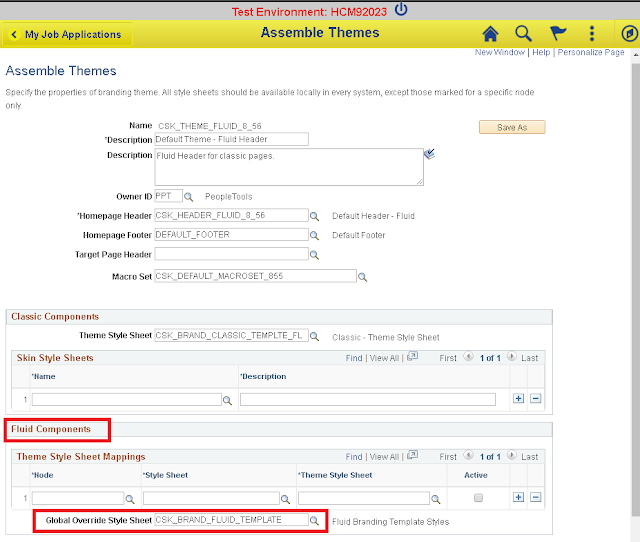
We can do this by using CSS to override the icon on different form factors. I added the following styles at the end of my Fluid - Global Override Style Sheet used in my Branding Theme.
Fluid - Global Override Style Sheet

CSS referenced in Theme Definiton
CSS for Reference
As we can see in the CSS, we can use a different image as the content for the File Upload icon based on the form factor.
Demo on Desktop (Extra Large Form Factor)

Demo on Mobile Device (Small Form Factor)

How can we customize the icons in the Fluid file attachment dialog box?
Further, how do we use different icons for different form factors?

We can do this by using CSS to override the icon on different form factors. I added the following styles at the end of my Fluid - Global Override Style Sheet used in my Branding Theme.
Fluid - Global Override Style Sheet

CSS referenced in Theme Definiton

CSS for Reference
As we can see in the CSS, we can use a different image as the content for the File Upload icon based on the form factor.
Demo on Desktop (Extra Large Form Factor)

Demo on Mobile Device (Small Form Factor)


